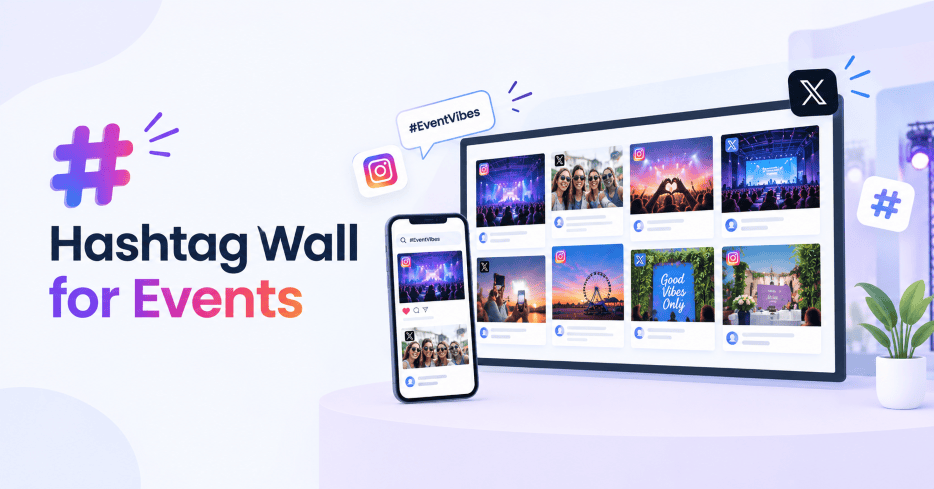
A hashtag wall for events collects posts shared with your event hashtag and turns them into a live display.
Attendees can share photos, videos, and updates on social media. Your hashtag wall brings those posts together and displays selected content on event screens, LED walls, digital signage, or your event website.
The hashtag gives people a simple way to participate. The wall gives their posts a place in the event.
Here’s how to plan, create, and use a hashtag wall for your next event.
What Is a Hashtag Wall for Events?
A hashtag wall is a live social media display built around a specific hashtag.
For an event, you might create a hashtag such as #TechSummit2026. Attendees use it when they share photos, videos, quotes, or event moments. The hashtag wall collects those posts and brings them into one live feed.
You can then moderate the content, customize the display, and show it on screens around the venue.
A hashtag wall can also pull content from several social platforms, depending on the tool you use. Social Walls supports sources including Instagram, X, TikTok, Facebook, LinkedIn, and direct attendee uploads through SnapUp.
Why Use a Hashtag Wall at an Event?
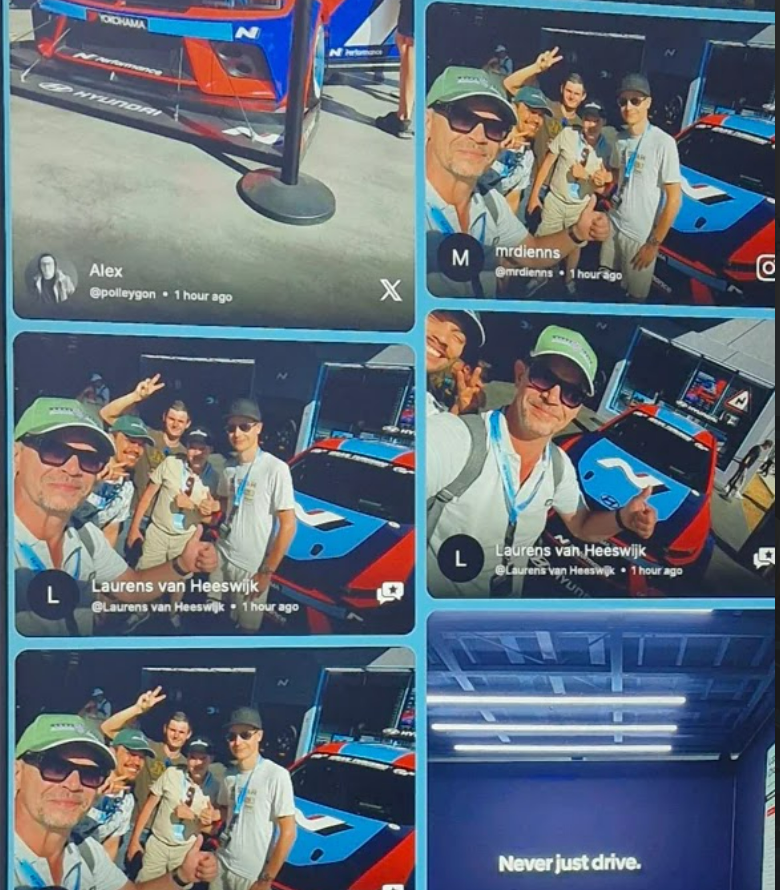
A hashtag wall gives attendees a visible reason to share. Someone posts a photo. Their post appears on the event screen. Another attendee sees it and decides to share their own moment.
That creates a simple loop:
Share → See → Participate → Share again
You can use an event social wall to:
- Showcase attendee experiences
- Highlight speakers and sessions
- Give sponsors more visibility
- Collect user-generated content
- Create social proof around the event
- Encourage audience participation
- Keep screens active between sessions
The wall becomes part of the event experience.
How Does an Event Hashtag Wall Work?
Creating a hashtag wall for events usually follows a simple flow.
1. Choose Your Event Hashtag
Pick one hashtag that is easy to remember and type. For example:
#BrandSummit26
#FutureOfRetail
#DelhiTechWeek
Keep it short and specific to your event.
2. Promote the Hashtag
Give people several chances to see it before and during the event. Add the hashtag to:
- Registration emails
- Event invitations
- Social posts
- Presentation slides
- Badges
- Stage screens
- Venue signage
- Table cards
- Speaker announcements
Make the hashtag part of the event communication from the beginning.
3. Connect the Hashtag to Your Social Wall
Use a social wall platform to collect posts using your hashtag.
With Social Walls, you can collect social content through hashtags, handles, mentions, and other sources, then bring it into one live display.
You can also add direct attendee submissions through SnapUp. Attendees scan a QR code and upload photos or videos directly to the wall.
4. Moderate the Content
Your event screen represents your brand, so curate the content before it reaches the audience. Social Walls offers manual moderation and AI-powered moderation. You can review posts, apply rules, filter keywords, identify duplicates, and curate content for the live wall.
5. Customize the Display
Give your event hashtag wall the same visual identity as the event. Use your brand colors, layouts, logo, background, and other design elements to make the wall feel like part of the venue.
6. Put the Wall Where People Look
Choose locations with natural audience traffic. Good options include:
- Main stage screens
- Registration areas
- Networking spaces
- Sponsor areas
- Exhibition halls
- Lounge areas
- Entrance screens
- LED walls
You can also embed the wall on your event website.
10 Ways to Use a Hashtag Wall at Events
A hashtag wall becomes more valuable when you give it a clear role.
1. Create a Live Event Photo Wall
Give attendees a way to see the event through everyone’s eyes. Show photos from networking, sessions, booths, speakers, food, and behind-the-scenes moments. As people keep posting, the wall becomes a live visual record of the event.
2. Put Attendees on the Big Screen
People enjoy seeing their posts appear on event screens. Feature attendee photos, videos, reactions, and event moments throughout the day. You can also use Spotlight to feature selected posts and give them more visibility. Social Walls supports Spotlight alongside other event engagement features.
3. Turn Your Event Hashtag Into a Challenge
Give people a specific reason to post. For example:
“Show us your favorite moment from #BrandSummit26.”
Or:
“Post your best booth photo with #FutureOfRetail.”
A clear prompt makes participation easy to understand. You can also turn the hashtag into a contest and feature selected entries on the live wall.
4. Give Sponsors a Place in the Conversation
Sponsors can become part of the live content experience. Feature attendee posts from sponsor booths, product demonstrations, activations, or sponsored sessions. Spotlight can also help event teams highlight selected sponsor, speaker, or VIP content on the wall.
5. Highlight the Best Moments So Far
Use the wall to create a running event recap. Feature:
- A great speaker quote
- A packed session
- A memorable attendee photo
- An audience reaction
- A popular booth
- A behind-the-scenes moment
People can quickly see what is happening around the venue.
6. Bring Social Content Into Networking
Networking happens throughout the event, and the social wall can keep that activity visible. Show posts from attendees, speakers, exhibitors, and partners. Someone might spot a company they want to meet, discover a speaker they want to hear, or find a conversation they want to join. The wall becomes another conversation starter.
7. Add Live Polls and Reactions
Your hashtag wall can also become a point of interaction. Social Walls supports live polls and reactions, giving attendees ways to respond to content and questions in real time. Ask a question during a session and display the responses on the screen. For example:
“Which topic should we explore next?”
The audience responds, and the results become part of the live event experience.
8. Collect Content Directly From Attendees
Social media gives you one way to collect event content. You can also give attendees a direct upload option. With SnapUp, attendees scan a QR code and submit photos, videos, or messages directly to your wall. This works well for event activities such as:
- Photo challenges
- Guest galleries
- Booth experiences
- Team photos
- Event messages
- Behind-the-scenes content
9. Create a Live Leaderboard
Turn event participation into a friendly challenge. A leaderboard can recognize attendees who are actively posting, participating, or engaging with the event. Display the rankings on your social wall and give people a reason to check back throughout the day. Social Walls includes a leaderboard as part of its event engagement features.
10. Build a Visual Event Recap
Keep the strongest posts from the event and turn them into a visual recap. Show attendee photos, speaker moments, audience reactions, and standout posts. You can use the content on your website, social channels, emails, or screens after the event. Your hashtag becomes a record of the experience people created together.
How to Choose the Right Event Hashtag
Your hashtag makes the content easier to collect and follow. A good event hashtag should be:
- Short: People can type it quickly.
- Specific: It clearly connects to your event.
- Easy to spell: Simple spelling makes sharing easier.
- Consistent: Use the same hashtag across your event materials.
- Distinctive: Choose something that clearly belongs to your event.
Check the hashtag before launching your campaign. Search for it on the platforms you plan to use and confirm that it gives your event a clear content stream.
Where Should You Display Your Hashtag Wall?
The location can shape how often people see and interact with your wall.
Main Stage
A large screen can make attendee content part of the main event atmosphere.
Registration Area
Start the social experience as soon as people arrive.
Networking Area
Give attendees something to see and talk about between sessions.
Exhibition Hall
Highlight exhibitors, attendee activity, and booth experiences.
Sponsor Booths
Show content related to sponsor activations and encourage visitors to share their experiences.
Event Website
Embed the social wall so people following the event remotely can see the conversation.
Multiple Event Screens
Large events can display the same live content across several screens, giving more attendees a chance to see their posts.
How to Keep Your Hashtag Wall Active
Give attendees simple prompts throughout the event.
Before the event
“What are you looking forward to at #BrandSummit26?”
During the event
“What was your biggest takeaway from the keynote?”
During networking
“Who did you meet today?”
Before closing
“Share your favorite moment from #BrandSummit26.”
You can also feature selected posts, run reactions or polls, and use Spotlight or a leaderboard to keep participation moving throughout the day.
Hashtag Wall vs. Social Wall for Events
A hashtag wall centers the experience around an event hashtag.
A social wall for events can bring together several content sources in one display.
For example:
| Content source | Example |
| Hashtag | #BrandSummit26 |
| Attendee posts | |
| Speaker updates | |
| X | Live event conversations |
| TikTok | Short event videos |
| Mentions | Posts tagging your event account |
| Direct uploads | Photos and videos submitted through SnapUp |
his gives event teams more ways to collect and curate content.
With Social Walls, you can combine multiple social sources and direct uploads into one customizable feed for event screens, digital signage, or venue screens.
How Social Walls Can Power Your Event Hashtag Wall
Social Walls brings content collection, moderation, customization, and display into one workflow. You can collect content from social platforms, curate what appears, customize the wall, and publish it across event screens, digital signage, or your venue screen.
You can also add audience participation features such as SnapUp, reactions, polls, Spotlight, and Leaderboard to build a more interactive event experience.
That gives your event team one place to manage the content and the experience around it.
What to Plan Before Your Event
Use this checklist before the event goes live:
- Choose your event hashtag
- Check that the hashtag is easy to remember
- Add it to your event communication
- Decide which social platforms you want to collect from
- Set up your social wall
- Create your visual theme
- Set your moderation process
- Test the content flow
- Test the screens
- Create prompts for attendees
- Decide how sponsors will appear
- Plan polls, challenges, or standout content moments
Run a full test before attendees arrive.
After testing, post content, check moderation, confirm the display, and make sure your event team knows how to manage the wall during the event.
Make Your Hashtag Part of the Event
A hashtag gives your audience a simple way to share what is happening. A hashtag wall for events gives those posts a bigger role.
Use it to showcase attendees, bring energy to event screens, highlight sponsors, collect UGC, support audience activities, and create a visual record of the day.
The strongest event walls give people a reason to participate. So when you plan yours, start with one simple question:
What do we want attendees to do?
Share a photo?
Answer a question?
Join a challenge?
Show their favorite moment?
See themselves on the big screen?
Once you know that, your hashtag wall can become part of the experience people came to have.


Leave a Reply